
Cake Work1.0 - App Store
You'll be able to see results in few seconds.
Publisher Description
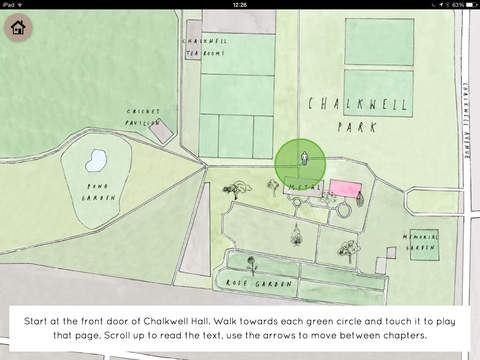
Have you ever been for a walk in a park and wondered if everything is quite what it seems? Ever wondered if the people and things you can see, hear, touch, taste and even smell are really the people and things you think they are?
Cake Work is a story devised by children from Milton Hall Junior School, working with writer, Jeremy Hardingham, illustrator, Zo Barker and workshop facilitators, Emma Mollica and Elsa James. It has two modes - 'Play in the Park' uses GPS to lay the story zones onto the park and 'Read the Story' is for reading at home.
The story was commissioned by Metal as part of NetPark, a unique digital art project mapping stories and artist projects onto Chalkwell Park.
NetPark is supported by the Digital R&D Fund for the Arts Nesta, Arts & Humanities Research Council and public funding by the National Lottery through Arts Council England.
This story App was supported with additional funding from Royal Opera House Bridge.
Requires iOS 7.0 or later. Compatible with iPad.
About Cake Work
The company that develops Cake Work is Metal Culture Ltd. The latest version released by its developer is 1.0.
To install Cake Work on your iOS device, just click the green Continue To App button above to start the installation process. The app is listed on our website since 2015-10-12 and was downloaded 0 times. We have already checked if the download link is safe, however for your own protection we recommend that you scan the downloaded app with your antivirus. Your antivirus may detect the Cake Work as malware if the download link is broken.
How to install Cake Work on your iOS device:
- Click on the Continue To App button on our website. This will redirect you to the App Store.
- Once the Cake Work is shown in the iTunes listing of your iOS device, you can start its download and installation. Tap on the GET button to the right of the app to start downloading it.
- If you are not logged-in the iOS appstore app, you'll be prompted for your your Apple ID and/or password.
- After Cake Work is downloaded, you'll see an INSTALL button to the right. Tap on it to start the actual installation of the iOS app.
- Once installation is finished you can tap on the OPEN button to start it. Its icon will also be added to your device home screen.
Program Details
System requirements
Download information
Pricing
Version History
version 1.0
posted on 2015-10-12
Disclaimer
Official App Store Link
We do not host Cake Work on our servers. We did not scan it for viruses, adware, spyware or other type of malware. This app is hosted by Apple and passed their terms and conditions to be listed there. We recommend caution when installing it.
The App Store link for Cake Work is provided to you by apps112.com without any warranties, representations or guarantees of any kind, so access it at your own risk.
If you have questions regarding this particular app contact the publisher directly. For questions about the functionalities of apps112.com contact us.
